


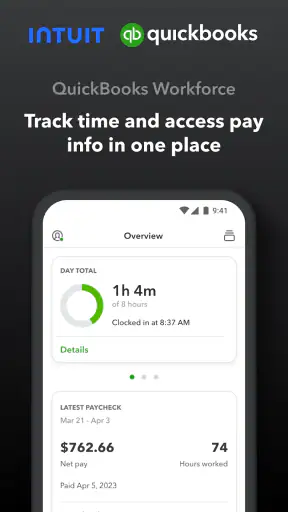
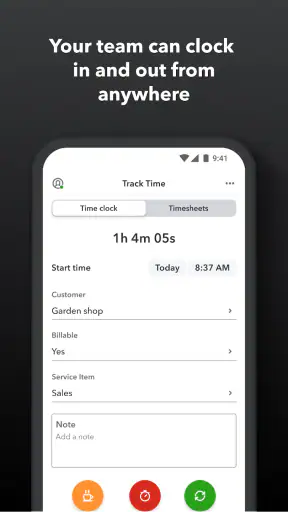
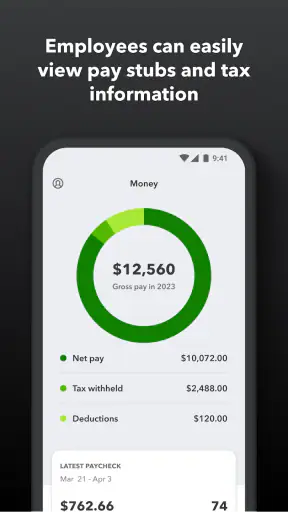
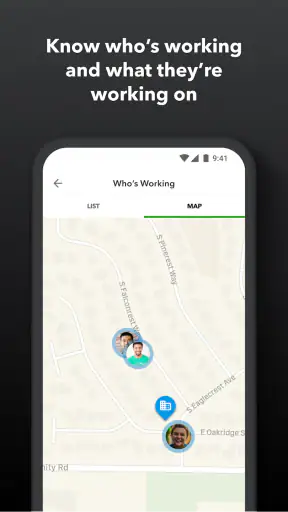
When a work app promises to put pay information and time tracking together, the real question is not whether the idea sounds useful. It is whether it makes an ordinary workday easier without creating another confusing place to check. After spending time with QuickBooks Workforce, I see it as a focused companion for employees and teams already working within the QuickBooks environment. It is not trying to be a complete payroll suite, a project-management platform, or a general office hub. Its value comes from keeping two practical tasks close together: checking pay details and recording time.
That narrow purpose is also the key to deciding whether it belongs on your phone. If your employer uses the QuickBooks workflow and wants staff to handle their own time information, this app can remove several small points of friction. If you are looking for a standalone time tracker, a scheduling tool, or a payroll system for a business that does not use QuickBooks, I would look elsewhere before installing it. The app is free, has an Everyone content rating, and comes from Intuit Inc, but those facts matter less than the relationship between the app and your employer’s existing setup.
What I would check before choosing it
My first decision criterion is not the interface; it is compatibility with the way your workplace handles payroll. Workforce is built around an employer-led process. That means an employee’s experience depends partly on how the company has configured its QuickBooks tools and what the employee has been invited or enabled to do. In practical terms, downloading the app alone does not turn it into a universal personal time clock. It is most useful when the organization has already chosen the surrounding QuickBooks workflow.
The second criterion is the kind of information you need during the week. If your main questions are “What hours have I recorded?” and “Where can I review my pay information?”, the app’s focused design makes sense. I like the idea of keeping those checks in one work-related place instead of searching through email attachments, paper statements, or separate tracking services. On the other hand, people who need detailed project budgeting, client invoicing, shift planning, or broad human-resources tools will probably find the scope too limited.
The third criterion is how much independence you expect. A personal timer usually lets you create your own categories, start and stop work for different projects, and build reports around your own habits. Workforce is different because the employer’s process is central. That can be a strength for consistent payroll records, but it can feel restrictive if you want to customize every part of your tracking routine.
I would also consider the size and working style of the team. For an employee who mainly needs a reliable way to review work-related information, a focused app is easier to understand than a large business platform. For a manager who needs to coordinate schedules, approve complex project allocations, or analyze labor across many departments, this should be viewed as one piece of the process rather than the whole solution.
The app has been available since October 1, 2013, and its current release is 4.96.1.20260813.2.RELEASE. It supports devices running iOS or Android version 9 and later. Those details make it accessible to people using older supported devices, although I would still keep the operating system and app updated when possible because work and pay information deserve a stable environment.
The everyday workflow feels most useful when expectations are clear
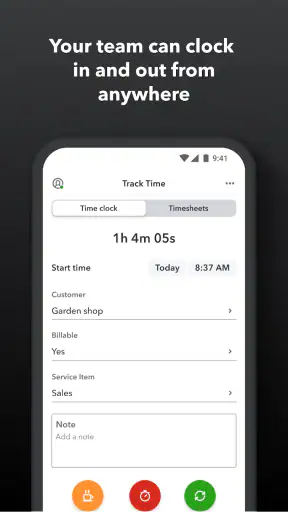
Imagine a part-time employee finishing a shift and wanting to record the hours before heading home. With a workplace that has enabled the appropriate QuickBooks process, the employee can use Workforce as the place to handle that time-related task rather than writing the hours on a note and trying to remember them later. At another point in the week, the same person can return to the app to review pay information. That is a small workflow, but it addresses a real problem: separating memory from payroll administration.
I find this especially helpful for people who work away from a desk. A phone-based work tool is easier to reach after a shift, during a break, or while moving between locations than a desktop-only system. The benefit is not that the app makes payroll exciting; it is that it puts a routine action close to where the workday actually happens.
There is an important habit I would recommend: check your recorded time while the details are still fresh, not only when payday arrives. If something looks wrong, an early review gives you more context when speaking with a supervisor or payroll contact. This is one of the less obvious benefits of a combined pay-and-time app. It encourages regular checking instead of treating payroll as a once-in-a-while mystery.
Another useful approach is to separate “recording time” from “proving a dispute.” Workforce can help you keep your own view of work information current, but employees should still follow their employer’s procedure when a time entry or pay detail needs correction. The app can be part of that conversation; it does not replace the company’s responsibility to explain its payroll process.
Where the focused design wins
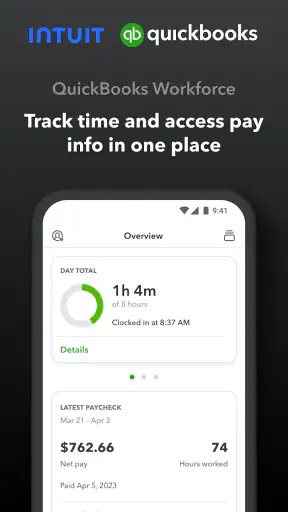
The strongest part of Workforce is its relevance to employees who do not want a full business dashboard. I would rather use a focused tool for checking pay information than navigate through unrelated accounting screens. By bringing time and pay into the same employee-facing experience, it reduces the mental gap between “the hours I worked” and “the pay information connected to those hours.”
That connection also helps new employees. Someone joining a small business may not know which system handles time, which one contains pay information, or whom to ask for every basic question. A dedicated employee app gives the workplace a clearer destination. It does not eliminate the need for an employer to explain the rules, but it can make the starting point less confusing.
I also see value for teams that want employees to take more responsibility for routine checks. When workers can look at their own information, they do not have to ask a manager for every simple confirmation. That can reduce interruptions, particularly in small businesses where the same person may be handling payroll, scheduling, and daily operations.
The app’s popularity supports the idea that this use case is resonating. It has an average rating of 4.7 from around 66 thousand ratings, with more than 5 million installs. I would not treat those figures as proof that every workplace will have a smooth experience, because employer configuration and local processes still matter. They do suggest that Workforce has become a familiar option for a substantial number of people.
One practical strength is that the app keeps the employee’s attention on work records rather than on accounting terminology. That matters for staff members who are comfortable using a phone but do not want to learn bookkeeping software. The best employee tool is often the one that makes the correct action obvious enough to repeat every week.
There is also a useful trade-off in having pay information and time tracking close together. You gain a more coherent personal view of your work records, but you also become more dependent on the accuracy and timeliness of the employer’s setup. If the company has not maintained its process well, a neat interface cannot solve the underlying issue. In my view, this is a reason to judge the workplace workflow and the app together, not the app in isolation.
Where another category may fit better
The usual alternatives fall into several categories, and each solves a different problem. A personal time tracker is often better for freelancers who need to measure hours across their own clients without an employer-managed payroll connection. A project-management platform is a stronger choice for teams that need tasks, deadlines, discussions, and time spent in one workspace. A scheduling or shift-management service may be more appropriate when the central concern is who works when, rather than reviewing pay information.
I would not choose Workforce as my first option for detailed client billing. A freelancer may need custom hourly rates, project labels, invoice preparation, and reports designed for customers. Those needs belong to a broader business workflow. Workforce makes more sense when the time being recorded is part of an organization’s employee payroll process.
It is also not the obvious choice for a manager seeking a complete workforce-management system. Managers may need staffing forecasts, approvals, attendance policies, labor analysis, or communication features. Since Workforce is presented as an employee-focused way to view pay information and track time, I would treat it as a companion rather than assume it contains every administrative function a manager wants.
For a very small team, the alternative may be a simple shared process. A spreadsheet or paper record can appear cheaper and more flexible, but it places more responsibility on someone to maintain formulas, protect sensitive information, chase missing entries, and reconcile records. Workforce is more attractive when the business already uses QuickBooks and wants employees to interact with a dedicated tool instead of a homemade system.
There is another situation where I would hesitate: workers who regularly move between several employers or systems. If each workplace uses a different method, Workforce may be convenient for one job but not serve as a universal personal dashboard. In that case, a separate personal organizer might offer a broader view, while Workforce remains the place for the employer-specific record.
The hidden cost of changing your routine
Switching to any work app has a cost that is easy to underestimate. The first cost is learning the workplace’s expectations: when time should be recorded, how corrections are requested, and which information employees are expected to review themselves. Workforce may be simple to open, but the surrounding rules still need to be understood.
The second cost is consistency. A time record is only useful if employees enter it in the expected way. I would build a small routine around the app: record time at the agreed moment, review entries before the payroll cutoff, and raise discrepancies while the relevant shift is easy to remember. This is more reliable than trying to reconstruct an entire pay period from memory.
The third cost is moving away from an old record-keeping habit. If your team has used a spreadsheet, notebook, or another tracker, do not assume that installing Workforce automatically transfers the practical knowledge built into that system. Before changing, decide which records must remain available, who will answer questions, and how corrections will be handled during the transition.
For employees, the change is usually manageable when the employer gives clear instructions. For employers, the bigger challenge is communication. Staff need to know what the app is for and what it is not for. They should not be left guessing whether a missing pay detail is an app problem, a payroll timing issue, or something that requires a manager’s help.
Privacy and access also deserve ordinary common sense. Because the app relates to pay information, I would use a personal device carefully, keep the device protected, and avoid sharing account access. I would also make sure I know how to contact the employer when something looks incorrect. A convenient app should support responsible handling of work information, not encourage casual sharing.
The free price makes trying it less difficult for employees, but “free” does not remove the organizational cost of setup, training, and support. The employer’s existing QuickBooks arrangements are the practical context. If the business is not using that ecosystem, choosing Workforce may create more coordination work than it saves.
Who should use it, and who should skip it?
I would recommend Workforce to employees whose company already relies on QuickBooks and wants a straightforward place for pay information and time tracking. It is particularly suitable for people who work from mobile devices, prefer a focused interface, and want to check their own records without opening a larger accounting system.
I would also consider it a good fit for small-business teams where managers need employees to handle routine checks themselves. The app can give workers a clearer role in keeping time records current, while managers remain responsible for the company’s payroll process. That division is healthier than making one busy person answer every basic question.
I would skip it if I needed a standalone timer for independent work, a full scheduling platform, an invoicing system, or a broad collaboration space. I would also hesitate if my employer had not explained how the app fits into payroll. In that situation, the problem is not necessarily the software; it is that the workflow is not ready for employees to rely on it.
Its Everyone age rating is appropriate for a general workplace utility, and the app is free to install. Still, an age rating does not tell you whether it matches your job. The important question is whether your employer’s process gives the app a meaningful role.
My recommendation after weighing the trade-offs
My overall view is positive but deliberately specific: QuickBooks Workforce is a sensible employee companion, not a universal productivity app. I like it when the goal is to bring personal access to pay information and time tracking into one focused mobile experience. I would recommend it to a friend only after asking whether their employer uses QuickBooks and has explained the expected workflow.
The app’s 4.7 average rating and broad adoption make it easy to see why people try it, but I would not choose it solely because of popularity. The deciding advantage is fit. When the employer’s system and the employee’s daily routine line up, Workforce can make a repetitive administrative task feel much more manageable. When they do not, a personal tracker, project tool, or scheduling service may be the better answer.
In the end, I see the best use of this Productivity app as a quiet, practical one: open it when you need to record work time, check your pay information regularly, and use discrepancies as prompts to communicate early. Its real strength is reducing uncertainty around routine employee records, provided the workplace process behind it is already organized. For that audience, the free app from Intuit Inc is worth trying. For everyone else, I would choose a tool built around the work they actually need to manage.


